FortiAnalzyer Report for GB per day logs usage

The License Widget under FortiAnalyzer Dashboard shows GB/day for last 7 days only. But each day at midnight FortiAnalzyer generates a log with changes = “Used Log GB/day” which can be used to track the usage for longer period of time (depending on current Analytical Logs size. Refer: Analytics and Archive logs).

FortiAnalyzer self event logs are generated in ‘root‘ ADOM only, hence, the report can only be created in root ADOM.

  • Under ‘root‘ ADOM, go to Reports -> Report Definitions -> Datasets -> Create New -> give a name to the dataset, then select Log Type ‘Event‘ and use the following dataset in the Query section.

select
  extract(`msg`, 'for ([A-Za-z]+ [0-9]+, [0-9]+)') as "Date",
  extract(`msg`, ': ([0-9]+\.[0-9]+ [KMGT]?B)') as "Usage"
from
  $log
where
  $filter
  and (log_id = '0030039004')
  and `msg` LIKE 'Log volume for %'
GROUP BY
"Date",
"Usage"
ORDER BY
"Date"
  • Go to Reports -> Report Definitions -> Chart Library -> Create New -> Give a name and use the newly created dataset from the Dataset option. Under the Show Top option, set ‘0′ to include all results in the report.
  • Go to: Reports -> Report Definitions -> All Reports -> Report -> Create New.

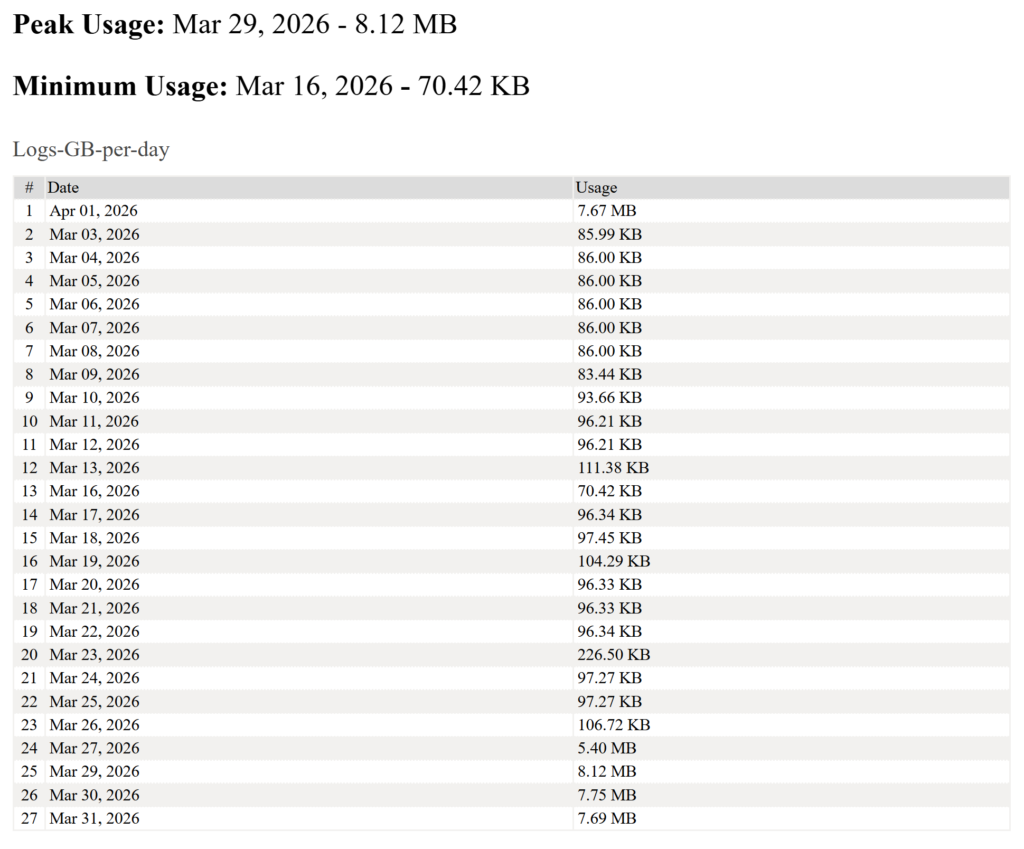
Final report output:

gb_day_report
Scroll to Top