Fetch VPN Monitor data using API
- FA
- Jan 17, 2026
In FortiManager the VPN Monitor is a centralized visualization and management tool (under Device Manager > Monitors) that allows administrators to track the health and performance of IPsec VPN tunnels. It provides a real-time overview of connectivity across the network, whether the tunnels were created via VPN Manager, templates, or directly on FortiOS.

To access the information of the VPN Monitor using API:
1. Login to FortiManager using CSRF method:
Technical Tip: How to login to FortiManager/FortiAnalyzer using API with CSRF cookies.
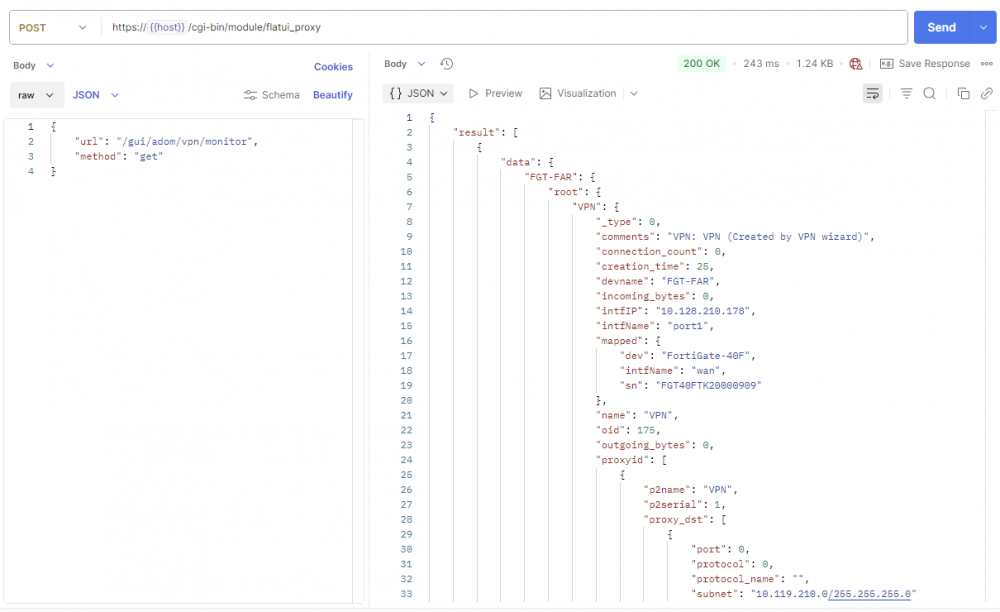
2. Create next POST request with:
URL:
https://{{host}}/cgi-bin/module/flatui_proxy
|
1 2 3 4 5 |
{ “url”: “/gui/adom/vpn/monitor”, “method”: “get” } |
Sample screenshot.
To get the API Collection click here. This can be imported into Postman (tested with v11.74.5).
• Under the ‘Variables‘ tab of the collection, the following variables are required:
○ host: IP address of FortiManager/FortiAnalyzer.
○ ADMIN: Admin user.
○ PASSWORD: Admin user password.